
Special Offer: Enjoy a FREE 24-Hour IPTV Trial with 24/7 Customer Support – Test the service risk-free before subscribing!
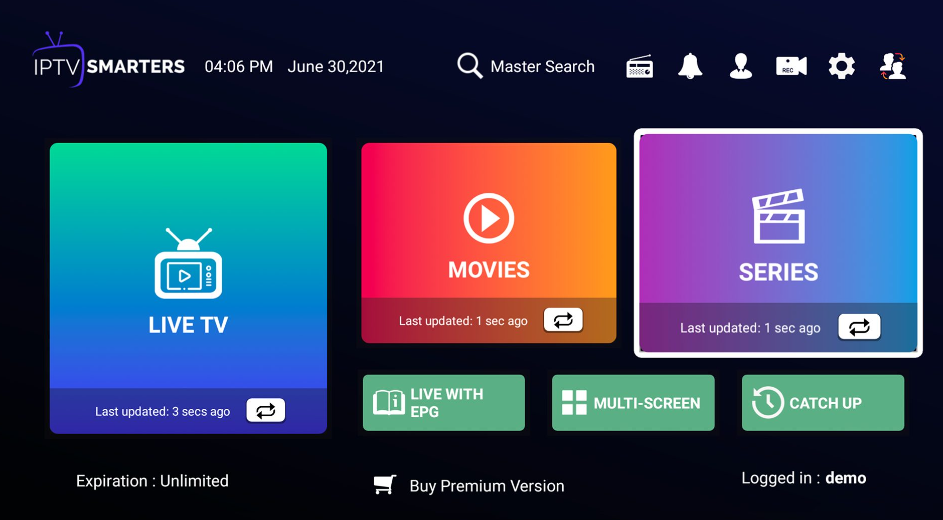
IPTV Smarters Pro has become one of the most popular IPTV players in the world, trusted by millions of users who want to stream live TV, movies, series, and sports in high quality on all devices. Whether you are new to IPTV or an experienced user looking for a powerful and reliable IPTV player, IPTV Smarters Pro is often the first name that comes up.
In this complete guide, you will learn everything about IPTV Smarters Pro: what it is, how it works, how to install it, supported devices, features, advantages, setup tutorials, troubleshooting tips, and why it remains one of the best IPTV players in 2026.
What Is IPTV Smarters Pro?
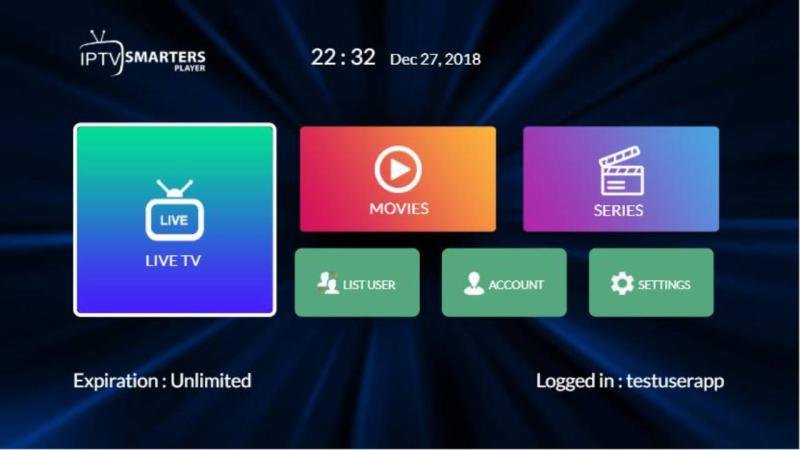
IPTV Smarters is a powerful IPTV player application that allows users to stream live TV channels, video on demand (VOD), TV series, and catch-up content using IPTV subscriptions.
⚠️ Important: IPTV Smarters Pro does not provide content by itself. It is only a media player. To use it, you need an IPTV subscription (Xtream Codes or M3U link) from a reliable IPTV provider.
Why IPTV Smarters Pro Is So Popular
The success of IPTV Smarters comes from its user-friendly interface, high compatibility, and advanced features that work smoothly across multiple devices.
Key Reasons for Its Popularity:
- Clean and modern UI
- Extremely easy setup
- Works with Xtream Codes & M3U
- Supports Live TV, Movies & Series
- Stable performance with minimal buffering
- Multi-screen and parental control options
- Compatible with almost all IPTV services
IPTV Smarters Pro Supported Devices
One of the biggest strengths of IPTV Smarters is its wide device compatibility.
Supported Platforms:
- ✅ Android TV & Android Box
- ✅ Amazon Firestick & Fire TV
- ✅ Smartphones (Android & iOS)
- ✅ Smart TVs (Samsung & LG via alternatives)
- ✅ Windows & macOS
- ✅ Tablets & iPads
This makes IPTV Smarters an all-in-one IPTV solution, whether you are watching at home or on the go.
Main Features of IPTV Smarters Pro
🔹 Live TV Streaming
Watch thousands of live TV channels from around the world including:
- Sports
- News
- Movies
- Entertainment
- Kids channels
- International channels
🔹 Movies & Series (VOD)
Access huge libraries of movies and TV series with:
- HD / Full HD / 4K quality
- Subtitles support
- Resume playback
- Category sorting
🔹 Electronic Program Guide (EPG)
The built-in EPG lets you:
- View TV schedules
- See current & upcoming programs
- Navigate channels easily
🔹 Catch-Up TV
Missed your favorite show?
IPTV Smarters supports catch-up TV (if provided by your IPTV service).
🔹 Multi-Screen & Multi-User
- Watch multiple channels simultaneously
- Add multiple IPTV accounts in one app
🔹 Parental Control
Protect your family by:
- Locking adult content
- Restricting channels with a PIN
How IPTV Smarters Pro Works
IPTV Smarters works by connecting to your IPTV provider using one of these methods:
1️⃣ Xtream Codes API (Recommended)
You enter:
- Username
- Password
- Server URL
This method is faster, more stable, and highly recommended.
2️⃣ M3U Playlist URL
You paste your M3U link provided by your IPTV service.
Both methods allow instant access to:
- Live TV
- Movies
- Series
- EPG (if supported)
How to Install IPTV Smarters Pro (Step-by-Step)
📌 Android / Android TV
- Open Google Play Store
- Search IPTV Smarters
- Install and open the app
- Add your IPTV login details
📌 Firestick / Fire TV
- Enable “Apps from Unknown Sources”
- Install Downloader app
- Download IPTV Smarters Pro APK
- Install and log in
📌 iPhone / iPad
- Available on App Store (Lite version)
- Or use alternative Smarters apps
📌 Windows & macOS
- Download desktop version
- Install and connect IPTV credentials
IPTV Smarters Pro vs Other IPTV Players
| Feature | IPTV Smarters Pro | TiviMate | IBO Player |
|---|---|---|---|
| Free App | ✅ | ❌ | ❌ |
| Xtream Codes | ✅ | ✅ | ✅ |
| VOD Support | ✅ | ❌ | ✅ |
| Multi-Device | ✅ | Limited | Limited |
| Beginner Friendly | ⭐⭐⭐⭐⭐ | ⭐⭐⭐ | ⭐⭐⭐⭐ |
Winner: IPTV Smarters (best all-around IPTV player)
Is IPTV Smarters Pro Legal?
IPTV Smarters Pro itself is 100% legal.
It is simply a media player.
⚠️ The legality depends on:
- The IPTV service you use
- The content rights in your country
Always choose a trusted IPTV provider and respect local laws.
WHATSSAP: https://wa.me/33753562778
Best IPTV Settings for IPTV Smarters Pro
To get the best performance, use these settings:
- Video Decoder: Hardware
- Buffer Size: Medium or Large
- Auto Frame Rate: ON
- VPN: Optional (recommended for privacy)
These settings reduce buffering and improve streaming quality.
WHATSSAP : https://wa.me/33753562778
Common Problems & Fixes
❌ Buffering Issues
✔ Check internet speed (minimum 20 Mbps)
✔ Restart app & router
✔ Change decoder settings
❌ EPG Not Working
✔ Refresh EPG
✔ Check if provider supports EPG
❌ Login Failed
✔ Double-check username/password
✔ Verify server URL
IPTV Smarters Pro Free Trial – Why You Should Test Before Buying
Trying IPTV before subscribing is essential. A 24-hour free IPTV trial allows you to:
- Test channel quality
- Check buffering & stability
- Explore VOD content
- Verify device compatibility
💡 Tip: Always choose an IPTV provider that offers a free trial + 24/7 support.
Advantages of Using IPTV Smarters Pro in 2026
✔ One of the most stable IPTV players
✔ Constant updates & improvements
✔ Excellent user experience
✔ Works with almost all IPTV services
✔ Perfect for sports, movies & series lovers
Who Should Use IPTV Smarters Pro?
IPTV Smarters is ideal for:
- Sports fans
- Movie & series lovers
- International TV watchers
- Families (with parental control)
- Beginners & advanced users
Final Verdict: Is IPTV Smarters Pro Worth It?
Absolutely YES.
IPTV Smarters Pro remains one of the best IPTV players in 2026, combining performance, simplicity, and powerful features in one app. When paired with a high-quality IPTV provider, it delivers an exceptional streaming experience on any device.
🎁 Don’t forget:
Start with a FREE 24-Hour IPTV Trial, enjoy 24/7 customer support, and experience premium IPTV without risk.